Monitor your Microsoft 365 from one portal

EyeNotify is the portal where you manage your Microsoft 365 tenant and the watchdog that keeps an eye on your environment day and night. Suspicious email, hijacked accounts, risky sharing, quarantine, devices and policies: all on one platform, with a clear verdict and concrete advice — and you intervene right away.

By EyeXS · runs in a data center in the Netherlands

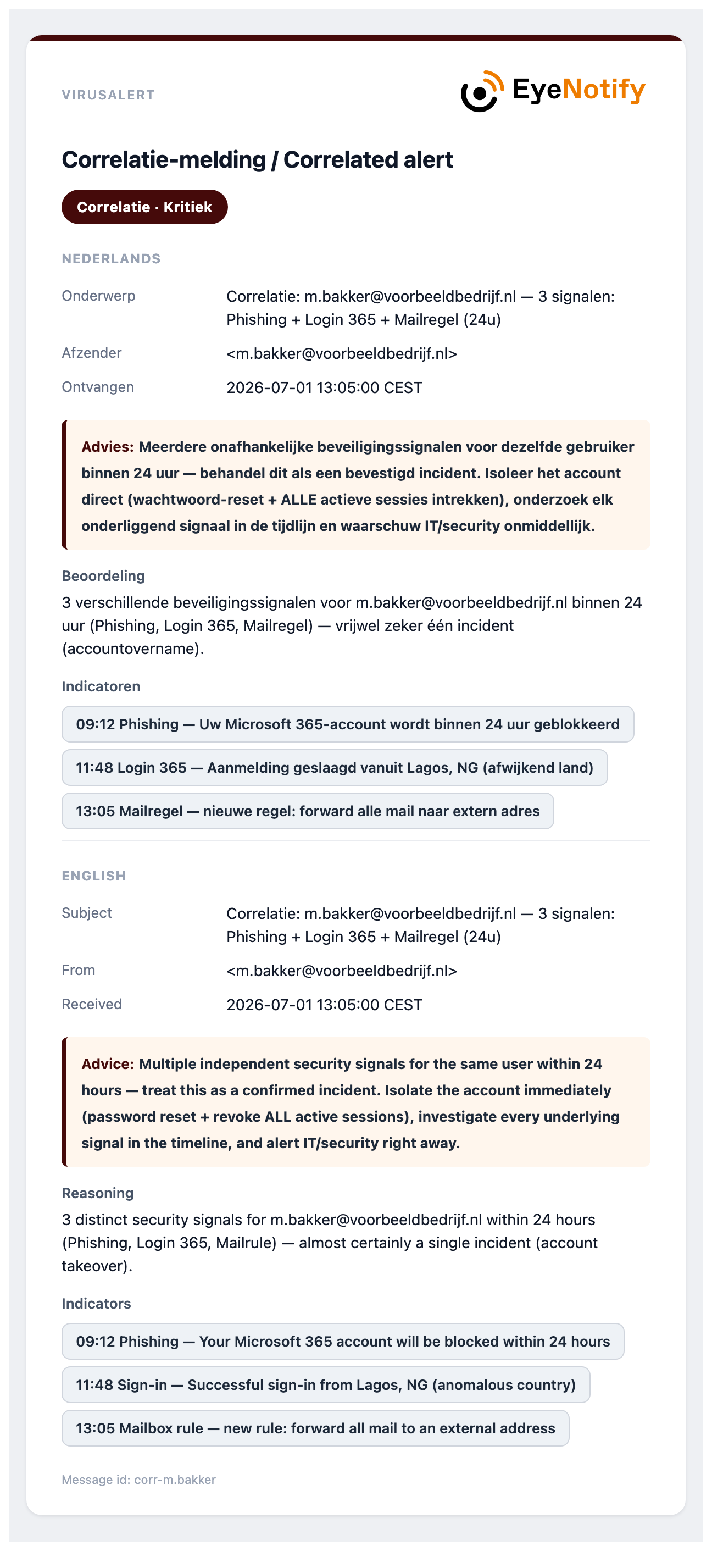
Example of an EyeNotify correlation notification — multiple signals for one user within 24 hours
  1. 09:12 Phishing email received
  2. 11:48 Login from Lagos
  3. 13:05 New forwarding rule
  4. 3 signals → 1 critical notification
Read on
The challenge

A convincing attack often looks completely normal

Cyber ​​attacks rarely start with a striking warning. They start with a credible message, a normal login or a file that no one immediately distrusts. And anyone who wants to check has to go through Exchange, Entra, Intune and Defender.

Suspicious email

What slips through the filter?

There is also no 100% guarantee with Microsoft Defender or other spam filters. Are you unsure about a message in your inbox? Forward it to EyeNotify for a verdict: phishing, spam, malware or clean, including action advice.

Microsoft 365

What happens to your data?

Strange behavior SharePoint and OneDrive stands out: anonymous sharing links, a copied URL or a contaminated file. EyeNotify reports directly what happened, Where and for whom it is intended.

Separate file

Can this file be opened safely?

Receive an attachment via email, USB stick or a shared folder? Upload it the Scanner. Multiple virus and malware engines immediately return the file malicious or clean.

The service

Three levels, one portal

Start with monitoring, add intervention and management, and optionally bring your devices and policies into the same portal. Each level includes everything from the previous one.

Monitor

Monitoring

  • Phishing, BEC and malware detected, with verdict and advice
  • Suspicious logins, mailbox rules, outbound phishing and data theft
  • Notifications by email, Teams and Pushover
All features →
Intervene & manage

Response

  • Revoke sessions — automatically on session theft if you wish
  • Block an account, delete a message and manage the Microsoft 365 quarantine
  • Every action logged and reversible
How intervention works →
Insight

SysDefend

  • PCs, Intune policies and Conditional Access in one overview — without three Microsoft portals
  • Daily score with advice in plain language
  • Notification as soon as security weakens
See SysDefend →
One platform

Portal and watchdog

During the day you work in the portal; the watchdog keeps watch in the meantime. Both look at the same environment and the same data, so every notification can be acted on right away — without logging in to another portal.

Portal

Your Microsoft 365 from one place

  • Notifications, logins, analysis and logging per domain
  • Release or delete quarantined mail; staff restore their own mail from Junk Email
  • Invoice monitoring, custom watch rules and settings per domain
  • PCs, Intune policies and Conditional Access in one overview (SysDefend)
  • Weekly and monthly reports, export and a Cbw/NIS2 evidence document
  • Fixed navigation bar on the left and a light or dark theme of your choice
See the portal →
Watchdog

Keeps an eye on your environment day and night

  • Phishing, BEC, malware and invoice fraud in email, with verdict and advice
  • If an external sender carries an employee’s name and there is no second signal, EyeNotify first asks the employee
  • Suspicious logins, mailbox rules, OAuth apps, MFA changes and data theft
  • Signals correlated into one critical notification per user
  • Notification as soon as a policy is switched off or a PC is no longer compliant
  • By email, Teams and Pushover — with intervention from the notification
All features →
How it works

From signal to verdict in minutes

From initial analysis to audit and adjustment: each layer adds context, so that a notification not only warns but also explains what you need to do.

01
Detect

Email, files, and Microsoft 365 behavior are continuously assessed.

02
To research

Signals are enriched, correlated and translated into a clear verdict.

03
Act & improve

Management intervenes in a controlled manner and feedback sharpens future notifications.

See the six layers of control →

What it looks like

A notification that explains what to do

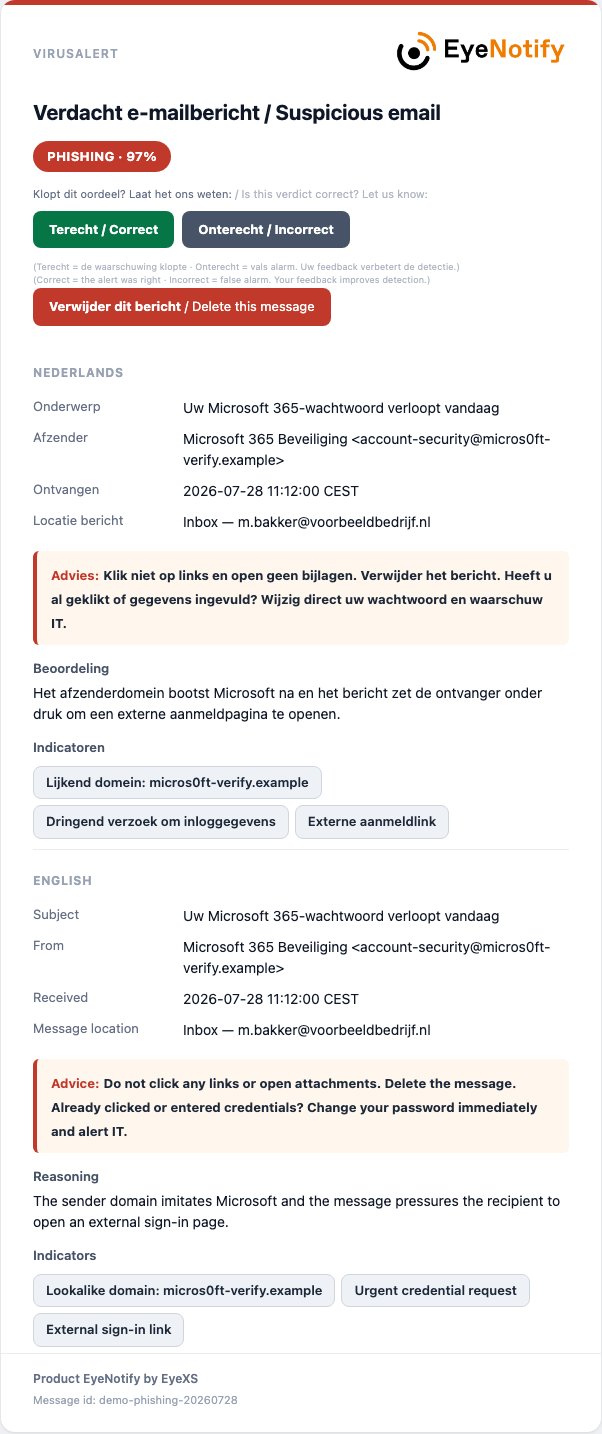
  • Clear verdict — phishing, spam, malware or clean, with a confidence percentage.
  • Concrete advice — what the recipient and IT should do now.
  • Correlated signals — an account takeover stands out as one critical notification.
  • Intervene immediately — from the notification or the portal.

See the portal →

Example of an EyeNotify email notification with verdict, advice and feedback buttons
Trust

Secure, verifiable and Cbw/NIS2-aware

Your data stays in the Netherlands, intervention only happens after confirmation, and you can demonstrate which Cbw/NIS2 measures EyeNotify supports.

Data in the Netherlands

Runs in a Dutch data center. Audit logs kept for 730 days, with daily backups.

You stay in control

No change for users. Only an administrator can intervene; SysDefend is read-only.

Cbw/NIS2 evidence

Live status per domain and a PDF for your auditor or board — without a full-compliance claim.

Read more about privacy, system boundary and Cbw/NIS2 →

Transparent rates

Choose the security that suits your organization

Start compact and scale easily. All packages are clear priced per mailbox, without surprises afterwards.

✓ Try it for free for 14 days ✓ No payment details required Prices excl. VAT
For small teams

EyeNotify Start

Fixed price for small teams — up to 10 mailboxes, setup included.

Try 14 days
Monitoring€45per month
Response€75per month
SysDefend€85per month
  • Guided setup (Microsoft 365 pairing + initial tuning) — free on an annual contract, €75 one-off on a monthly contract
  • Extra mailbox above 10 — at a graduated rate, with the Start price as a monthly minimum
Essential

Monitoring

from €2,55 per mailbox / month
100–249 mailbox tier

Detect and report — in-house.

  • All threat detection — phishing, BEC, logins, exfiltration
  • End-user notifications with verdict and advice
  • Teams and Pushover notifications
  • Portal with analysis, reports and export
  • File scanner
Try 14 days
Full visibility

SysDefend

from €5,55 per mailbox / month
100–249 mailbox tier

Everything from Response, plus insight into devices and policies:

  • One overview of Intune, Entra and Defender
  • Per PC: policies, encryption and Defender status
  • Per user: Conditional Access and MFA
  • Daily score and notification when security weakens
  • Read-only — requires Business Premium

See how SysDefend works →

Try 14 days
Fully managed

Managed

Custom quote managed service

Our Security Team handles the monitoring and incident response.

  • Everything from Response
  • EyeNotify Security Team monitors your Microsoft 365 environment
  • Proactive and reactive action in the event of emergencies
  • Incident follow-up and containment by our team
  • Periodic feedback and advice
Contact us

Full comparison and volume pricing →

Prices per mailbox per month, excl. VAT. Volume discount from 11 mailboxes; 7% cheaper with an annual contract, including free setup.

Not yet sure which package suits you? We will assist you without obligation and advise you based on your environment — not based on the most expensive subscription.

Discuss your situation
Try it for free for 14 days

Experience for yourself how quickly a threat becomes apparent

We will personally help you connect your Microsoft 365 environment. You can safely try EyeNotify with your own organization within one working day.

  • Guided setupWe will take care of the first connection together with you.
  • Full functionalityDiscover monitoring, alerts, quarantine and the portal.
  • No obligationsNo payment details and the trial period ends automatically.
Your data remains in the Netherlands
Safe, shielded and personally supervised.
Request

Start your free trial

Briefly tell us for which organization you would like to try EyeNotify.

By submitting you agree to our privacy statement. No spam, no payment details.

Ready to get to grips with your Microsoft 365?

Contact your EyeXS contact person for a customized demo or quote.

Contact us

EyeXS BV
Kaldenkerkerweg 20
5913 AE Venlo
Netherlands

General: info@eyexs.com
Sales: sales@eyexs.com
Support: support@eyexs.com
Telephone: +31 77 382 80 53

Use ← → to browse · click next to the image or Esc to close